Notion → n8n → Gmail: Automated Lead Outreach for a Fractional CMO
The Problem
Cristina is a Fractional CMO building brands for tourism, adventure, and wellness businesses in Crete. She’s exceptional at brand relationships and closing — but getting leads in the door was costing her 5+ hours a week of pure manual grind: find the company, find the email, find the Instagram, make notes in Notion, draft a template, personalise it, send it. One lead at a time. She knew it was a numbers game and she couldn’t play it fast enough. She’d already burned herself out trying.
What We Built
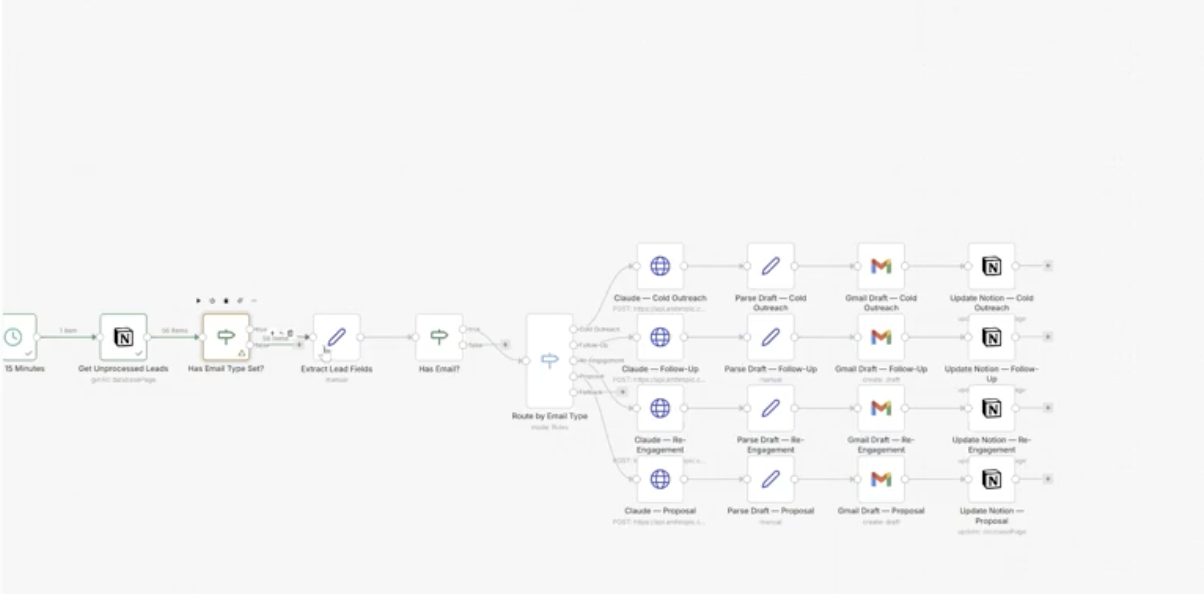
A single n8n workflow that polls her Notion CRM every 15 minutes, picks up any unprocessed leads, scrapes their website and Instagram for context, and routes each lead through one of four Claude-powered paths — cold outreach, follow-up, re-engagement, or proposal. Each path generates a fully personalised draft in Gmail. Nothing sends automatically. Cristina reviews, approves, hits send. Notion gets updated with a draft status so nothing falls through the cracks.
The whole thing runs on its own. She adds a lead to Notion, assigns an email type, and the draft is waiting in Gmail within 15 minutes.
What it actually does:
- Fetches unprocessed leads from Notion (only those without a draft status — no duplicates)
- Checks for valid email address before processing
- Scrapes lead website for business context
- Routes by email type: Cold Outreach / Follow-Up / Re-Engagement / Proposal
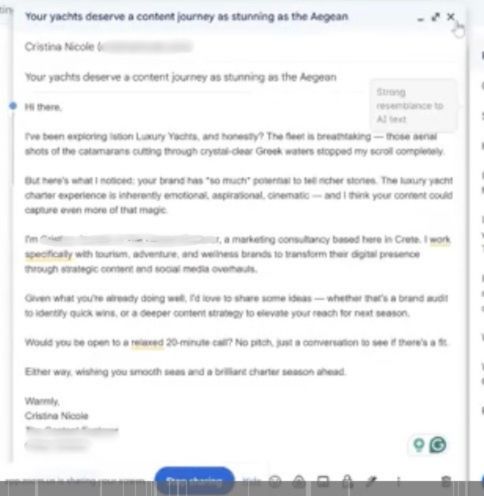
- Claude generates a personalised email for each path using scraped data + brand voice
- Gmail draft created, nothing sent
- Notion record updated to
Draft Created
Tech Stack
- n8n (cloud) — workflow orchestration, polling trigger, routing logic, loop handling
- Notion — lead CRM and source of truth; email type field drives the routing
- Claude Sonnet via Anthropic API — email generation across all four outreach paths
- Gmail — draft destination; human reviews and sends manually
- Website scraper node — enriches lead data before passing to Claude
Key Decisions
One workflow, four branches — not four separate workflows
The initial instinct might be to build separate automations for cold, follow-up, re-engagement, and proposal. Instead, a single router node reads the Email Type field in Notion and branches accordingly. Cleaner to maintain, easier to debug, and Cristina only needs to change one field in Notion to change what kind of email gets generated.
Human-in-the-loop by design, not as a fallback
Auto-sending was on the table. We ruled it out deliberately. Cristina’s clients are high-touch — tourism brands, wellness businesses, people who know people. A bad automated send does more damage than no send. The draft model means Claude does the research and writing heavy-lifting, Cristina does the relationship judgement call. That division of labour is the point.
Batch processing with unprocessed-lead detection
Early in testing the workflow only picked up the single most recently modified Notion record. We rebuilt the trigger logic to use a Get Many node filtered by empty draft status, so it processes every new lead added since the last run — not just the latest one. This was the difference between a toy and an actual system.
Expression-based field mapping after Notion property mismatches
Notion’s internal property names don’t always match what you see in the UI. Several nodes were mapping to incorrect field names, causing silent failures mid-workflow. Fixed by switching from fixed values to expressions and mapping directly from the JSON data panel — making every field reference explicit and traceable.
Outcomes
- 5+ hours per week returned from manual outreach grunt work
- Four personalised Gmail drafts generated and ready to send within one live session — including a subject line and body written to a real business pulled from Cristina’s existing lead list
- Notion CRM now doubles as a lightweight outreach controller — change the email type, the workflow handles the rest
- MCP access enabled so Claude can audit the workflow health directly going forward
What I’d Do Differently
Start with field mapping hygiene. We hit Notion property name mismatches mid-session that cost time to debug. In future builds, I’d screenshot and confirm every database field name before generating the JSON — saves a debugging loop that’s easy to avoid.
Document the Notion integration quirks upfront. Getting the internal integration secret, granting page-level access, and connecting to the specific database are three separate steps that aren’t obvious. That friction is now in a skill file so the next build skips it entirely.
Assets
Built by Tyson Venables — Flow OS | Flowstates Collective